Projects:
Photo Sorting •
Improved Mail Workflow
•
Floor Space Planning
•
Ressource Planning
•
Proof of Concept
Customer:
Thor Pedersen
Project:
Sort photo files based on available date information.
Challenge:
Finding the most reliable date contained in the image file in approx 250.000 files.Date sources are date in filename, in file properties or in EXIF information.
After traveling to every country in the world, in a little under 10 years, without using planes, a lot of image files gets accumulated in various media and from different cameras.
Goal:
All images reliably sorted into sub folders, based on date range.Result:
All 250.000 files processed.around 100.000 unique files with valid date reliably found.
Duplicates and Unreliable dates listed for manual inspection.
Project finished February 2025.
Key Features:
- Analyzing large quantity of files.
- Optimizing analyzing algorithms for speed due to large quantity.
- Finding all date information hidden in image file.
- Finding the most reliable date in files.
Process:
- Dialogs with customer to set best possible framework.
- A lot of testing to find the best algorithm.
- A lot of time verifying results.
Technical Details:
- Iterate a quarter of a million images using fast algorithms.
- Find duplicates using sha512 checksum.
- Find dates hidden in:
- Up to 3 different file properties.
- Up to 4 different EXIF date fields.
- Develop algorithm to determine which is the most reliable date.
Customer:

Project:
Improved mail workflow
Challenge:
Due to increased customer communication,
inbox overflows with mails in various states of read,unread,
processed and archived,
making it harder than necessary to keep an overview.Goal:
Improve workflow by automate proceses of handling mails to reduce the time and effort needed for daily mail tasks.Result:
By applying built in automation functions in Outlook,the task of handling incomming mails has become significantly easier.
Inbox went from a very large amount of mails, down to only a few.
Using applied simple setup, will keep the inbox in order.
Finished May 2024, May
Key Features:
Basic built-in Outlook performance optimizing
Process:
BM Regnskab was asked to note daily tasks that was performed repeatedly over a period of some weeks.DADREFO ApS setup functions for ease the handling of tasks, and trained BM Regnskab in use of applied functions
Technical Details:
- Single click moving of selected mails from inbox to archive
- Auto move mails based on rules
Customer:

Project:
Floors pace planning

Challenge:
The workload of planning the time and space of multiple production halls, for customer projects,has become increasingly heavy.
Goal:
Ease the workload on more departments and make the process more streamlined.
Result:
DADREFO ApS developed a browser-based application with intuitive interface for creating and placing projects on multiple floorplans across time and exporting derived information as separate documents, e.g., Gantt-like timeline.Workload significantly reduced, and more people can perform the tasks involved, making it faster and easier to maintain the plan.
After release of first production version, DADREFO ApS is doing support, maintenance, and further development on request.
- 2024, Apr - Release of requested features
- 2023, Jan, Feb, May - Release of requested features
- 2022, Dec - Release of production version
- 2022, July - First prototype
- 2022, Feb - First application demo
Key Features:
- Auto creating Gantt like timelines
- Create and edit projects and floorplans in 2D and time resolution from 1 day to 1 month using Advanced collision detection for fail safe placement of projects
- Create PDF from timelines
- Creation of PDF drawings from extracted data
- Import/export data for backup purposes
- Import of DXF drawings for showing projects
- Multiuser environment

Process:
During multiple online interviews with Gram Equipment A/S, the details.in the process was clarified.List of main requirements was created and agreed upon during brainstorming sessions.
DADREFO ApS performed analysis using tools from the LEAN toolbox:
- Value-Stream-Mapping to represent the current (AS-IS) and the future (TO-BE) process
- SIPOC for listing all parts of the process
- VOC/CTQ for clear description of the needs/requirements and goals
Based on above, a custom-made browser-based application was chosen.
During the development process, demos and prototypes were released at regular basis to show progress and align details in functionality.
Technical Details:
The browser-based application was developed using:
- Python Flask web framework as backend
- SQLite as database, using SQLAlchemy as ORM manager
- Python Report Lab for PDF outputs
- Vanilla JavaScript as frontend, using jQuery and DXF-parser
- Application tested using PyTest, Jasmine and Robot Framework
Customer:
Project:
Ressource planning
Challenge:
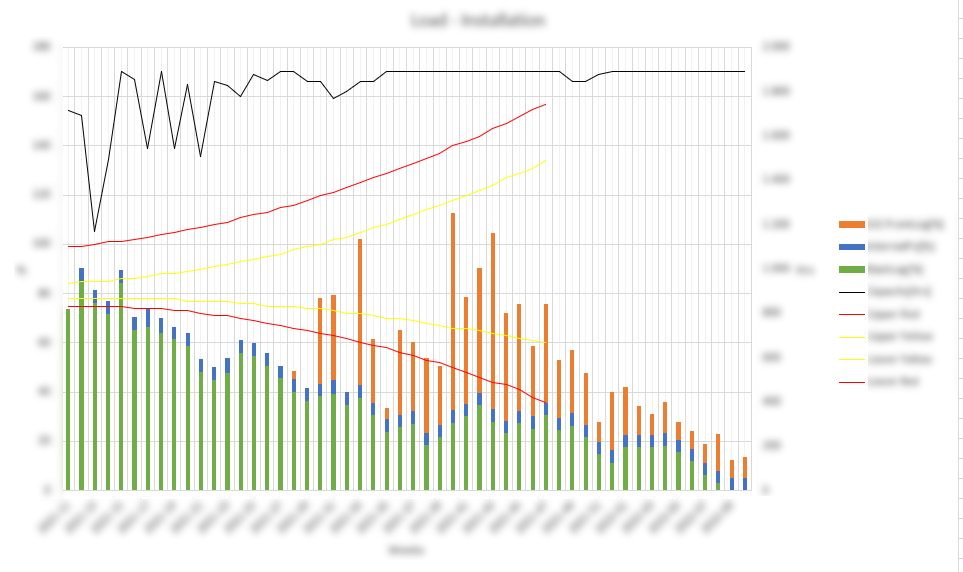
Create a tool that combines data from production planning and quotes and orders from ERP system, and visualize workload and ressource capacity one year ahead
Goal:
To have a better view of future workload to adjust staff in time according to need.
Result:
Excel based tool that collects, combines otuput from planning and ERP system, and shows match between workload and capacity pr departmnet pr week for one year ahead.After release of first production version, DADREFO ApS is doing support, maintenance, and further development on request.
- 2024, Jan - Release of update for new ERP system
- 2021, Okt - Release of minor bugfix version
- 2021, April - Release of requested features
- 2020, June - Release of requested features
- 2019, May - Initial release
Key Features:
- Complex VBA algorithems for attaining best possible result using given data
- Data set available as pivot data set and as graphical representation
- Excel based database extracts from ERP system
- Multiple user parameters and input files for fine tuning
- Special data export function co-developed with supplier of planning system

Process:
- Base requirements for tool analysed
- Close dialog with COO, S&OP Manager, Business Controller and project planner to get all input data aligned and to clear excact definition of algorithm
- Close dialog with supplier of planning system to get correct data from system
- Planning source data cleaned for inconsistencies in cooperation with project planner and supplier of planning system
- Develop application using Excel as basetool, using advanced VBA macro setup together with pivottables and graphical output
- After initial release, close dialog with VP Service to add extended features for service data
Technical Details:
- Using standard Microsoft Excel
- Advanced algorithems using VBA macro language
- Auto generate advanced pivottables using macros
- Auto generate graphical plots from pivottables using macros
Customer:


Project:
Data overview possible? (Proof of Concept)
Challenge:
Proof of concept.
Goal:
Overview by analysing and visualizing data
Result:
Concept proven to be not viable for continuation.
Customer:
[insert text]
Project:
Challenge:
[insert text]
Goal:
[insert text]
Result:
[insert text]
Key Features:
[insert text]
Process:
[insert text]
Technical Details:
[insert text]